
A small manufacturing company in Ohio got hit by ransomware on a Tuesday morning. Production stopped. Customer data was locked. The owner called his IT guy, who called a consultant who charged $400 an hour to tell him something painfully simple: there was no plan.
No framework. No documented response process. No idea which systems were most critical or how to recover them first. Three weeks and $180,000 later, the company was back online. The owner later said the worst part was finding out a free government framework existed that could have prevented most of it.
That framework was NIST CSF.
What is NIST CSF?
NIST CSF stands for the National Institute of Standards and Technology Cybersecurity Framework. It is a free, voluntary set of guidelines developed by the US government to help organizations of any size understand, manage, and reduce cybersecurity risk.
It does not tell you which software to buy or which vendor to use. It gives you a structured way to think about cybersecurity, identify what needs protecting, put the right safeguards in place, detect threats early, and recover fast when something goes wrong.
The framework was first published in 2014 for critical infrastructure sectors like energy and finance. In February 2024, NIST released version 2.0, explicitly designed for every organization regardless of size, industry, or existing security maturity.
What Changed in NIST CSF 2.0?
Version 1.1 was solid, but it had a narrow focus. It was built around critical infrastructure and assumed organizations already had some security foundation in place. Small businesses, schools, nonprofits, and startups were technically included, but the guidance did not speak to them directly.
CSF 2.0 changed three things fundamentally.
A Brand New GOVERN Function Was Added
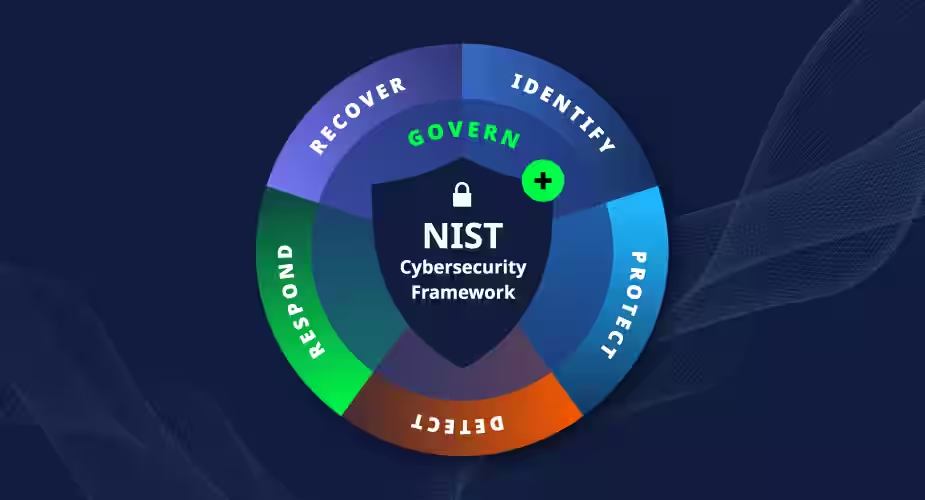
The original framework had five functions. CSF 2.0 added a sixth called GOVERN, which sits at the center of everything else. It addresses something the original version largely ignored: leadership accountability.
GOVERN ensures that cybersecurity is not just an IT department problem. It pulls the board, the C-suite, and senior management into cybersecurity decisions. It establishes who is responsible for what, how risk decisions get made, and how cybersecurity strategy connects to overall business strategy.
This addition reflects a real shift in how organizations think about cyber risk in 2026. A breach is no longer just a technical incident. It is a business event with legal, financial, and reputational consequences that leadership cannot ignore.
Expanded to All Organizations
CSF 2.0 explicitly states it is designed for organizations of all sizes, all sectors, and all levels of cybersecurity maturity. NIST published a dedicated Small Business Quick-Start Guide (SP 1300) alongside the main framework to make implementation accessible without expensive consultants or enterprise tools.
Supply Chain Risk Management Became a Priority
One of the most significant expansions in CSF 2.0 is the emphasis on supply chain risk. The SolarWinds attack in 2020 and dozens of similar incidents made it clear that your cybersecurity is only as strong as your vendors’ cybersecurity. CSF 2.0 dedicates significant attention to identifying and managing risks that come through third-party suppliers and software providers.
Core Functions of NIST CSF 2.0
Think of these six functions as the complete lifecycle of cybersecurity management. Each one addresses a different stage from strategy to recovery.
GOVERN
GOVERN is the new addition and the most important one for organizations that have treated cybersecurity as purely an IT concern. It covers leadership oversight, cybersecurity policies, risk management strategy, roles and responsibilities, and how cybersecurity decisions get made at the organizational level.
Without GOVERN in place, the other five functions have no direction. You end up with security tools nobody uses, policies nobody follows, and incident response plans nobody has read.
IDENTIFY
Before you can protect anything, you need to know what you have. IDENTIFY covers asset management, business environment analysis, risk assessment, and supply chain risk management.
In practice, this means documenting every device, system, application, and data source your organization relies on. It means understanding which of those assets are most critical to operations and what would happen if each one were compromised. Organizations take an average of 204 days to identify a breach in 2025. Most of that delay comes from not knowing what normal looks like, which is exactly what IDENTIFY is designed to fix.
PROTECT
PROTECT covers access control, data security, employee training, protective technology, and maintenance. This is the function most people think of when they think about cybersecurity because it involves the visible tools and policies: firewalls, encryption, multi-factor authentication, and security awareness training.
The key insight from CSF 2.0 is that PROTECT measures should be proportional to the risk identified in the previous function. Not every asset needs the same level of protection. Spending enterprise-grade security budget on a low-risk internal system is a waste. Underprotecting a customer payment database is negligence.
DETECT
DETECT focuses on continuous monitoring, anomaly detection, and threat intelligence. Its job is to identify cybersecurity events as quickly as possible after they occur.
The 204-day average detection time mentioned earlier is the exact problem DETECT is designed to address. Organizations that implement continuous monitoring, log analysis, and security alerts catch breaches in days or weeks instead of months. Every day a breach goes undetected is another day of damage accumulating.
RESPOND
RESPOND covers incident response planning, communications, analysis, containment, and mitigation. The Ohio manufacturer from the opening of this post had none of this. No plan, no communication protocol, no defined containment steps.
An incident response plan does not need to be a 200-page document. It needs to answer four questions clearly: who is responsible for what, who gets notified and when, how do we contain the damage, and what evidence do we preserve for investigation. Having those answers documented before an incident reduces response time and cost dramatically.
RECOVER
RECOVER addresses restoration planning, improvements from lessons learned, and communications during recovery. Its goal is to get as close as possible to normal operations in the minimum amount of time while making sure the same incident cannot happen again through the same entry point.
A complete recovery plan includes prioritized restoration sequences so the most critical systems come back online first, communication templates for customers and partners, and a structured post-incident review process.
The 4 Implementation Tiers of NIST CSF 2.0
NIST CSF uses four tiers to describe an organization’s current level of cybersecurity practice. These are not compliance checkboxes. They are a way to understand where you are and where you need to go.
Tier 1: Partial
Cybersecurity practices are informal and reactive. No documented policies. Risk management happens on an ad hoc basis when something goes wrong. Most small businesses without a dedicated IT team start here.
Tier 2: Risk Informed
The organization is aware of cybersecurity risk and has some practices in place but they are not consistently applied across the whole organization. Some departments follow security protocols. Others do not.
Tier 3: Repeatable
Formal cybersecurity policies exist and are consistently applied. Risk management is integrated into business decisions. Incident response plans are documented and tested. This is the target tier for most small and medium businesses.
Tier 4: Adaptive
The organization continuously improves its cybersecurity practices based on lessons learned and changing threat intelligence. Security investments adapt in real time to the evolving threat landscape. Large enterprises and organizations in high-risk sectors typically operate here.
Most small businesses should aim to move from Tier 1 to Tier 3 within 12 to 18 months. Tier 4 requires resources and maturity that most SMBs do not need to prioritize immediately.
How Small Businesses Can Implement NIST CSF 2.0
The biggest misconception about NIST CSF is that it requires expensive tools or outside consultants to implement. It does not. NIST designed CSF 2.0 specifically so that small businesses can begin with existing tools and internal resources.
Step 1: Download the Free Resources
Go to nist.gov/cyberframework and download the CSF 2.0 core document and the Small Business Quick-Start Guide (SP 1300). Both are free. The Quick-Start Guide is specifically written for organizations without dedicated security teams.
Step 2: Start With IDENTIFY
List every device, system, and application your business uses. Include laptops, phones, cloud services, payment systems, and any software your team relies on daily. Note which ones hold customer data or financial information. This inventory is the foundation of everything else.
Step 3: Assess Your Current Tier
Read the four-tier descriptions honestly and decide where your organization sits right now. Most small businesses land at Tier 1 or Tier 2. That is fine. Knowing where you are is the starting point.
Step 4: Pick Your Three Biggest Gaps
Compare your current practices against the six functions and identify the three areas where you are most exposed. For most small businesses, those gaps are in DETECT (no monitoring), RESPOND (no incident plan), and GOVERN (no leadership accountability for cybersecurity).
Step 5: Close One Gap at a Time
Do not try to implement everything at once. Pick the highest priority gap and address it first. Enable multi-factor authentication across all accounts. Write a basic incident response plan. Set up email security monitoring. Small, consistent improvements compound into real security maturity over 12 to 18 months.
FAQs:
No. NIST CSF is voluntary for most organizations. Some government contractors and regulated industries may face requirements to align with it.
CSF 2.0 added a new GOVERN function, expanded the scope beyond critical infrastructure to all organizations, and added supply chain risk management guidance.
Small businesses typically reach Tier 3 in 12 to 18 months, starting from basic practices. Large enterprises take longer, depending on complexity.
Yes. The framework, all quick-start guides, and implementation resources are completely free at nist.gov/cyberframework.
GOVERN is the new sixth function covering leadership accountability, cybersecurity strategy, risk policies, and organizational roles. It ensures cybersecurity is a business decision, not just an IT one.
Yes. NIST published a dedicated Small Business Quick-Start Guide specifically for organizations without large IT teams or security budgets.
NIST CSF is free, voluntary, and outcome-focused. ISO 27001 is an international standard with paid certification, more prescriptive requirements, and broader global recognition.

- OpenAI Discovers Self-Replicating Prompt Injection - September 27, 2026
- AI Safety Monitors Are Being Tested: What AISI Found - September 25, 2026
- Top 10 Influencer Marketing Agencies in Delhi - September 24, 2026