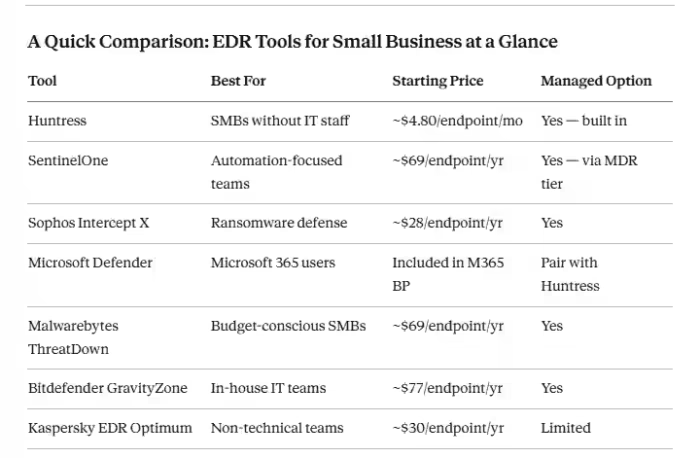
Here is the direct answer before we go deeper: the best EDR tools for small businesses in 2026 are Huntress (for businesses without IT staff), SentinelOne Singularity (for automation), Sophos Intercept X (for ransomware defense), Microsoft Defender for Endpoint (for Microsoft 365 users), and Malwarebytes ThreatDown (for tight budgets). Each one is covered in detail below.
Now, the story behind why this decision matters more than most small business owners realize.
It was a regular Tuesday morning for a small accounting firm in Ohio. Their office manager opened what looked like a vendor invoice, clicked on an attachment, and moved on with her day. Five days later, ransomware had spread silently across every device in the building. The attackers demanded $92,000. The firm paid. And then three months later, 69% of businesses that pay a ransom get hit again, because once cybercriminals know you will pay, you become a repeat target.
That firm had antivirus installed. It caught nothing. That is the gap EDR fills.
Verizon’s 2025 DBIR confirmed that 88% of SMB breaches involved ransomware — compared to just 39% at larger organizations. And 43% of all cyberattacks target small businesses, yet only 14% of SMBs have a cybersecurity plan in place. If you are running a business on antivirus alone in 2026, this article is the one that should change that.
What Is EDR and How Is It Different from Antivirus?
Endpoint Detection and Response (EDR) is security software that continuously monitors every device on your network, watches for suspicious behavior patterns, and responds automatically when something looks wrong, isolating threats before they spread.
Traditional antivirus software compares files against a list of known threats. Think of it like a bouncer checking IDs against a wanted poster. EDR is the security camera, the behavioral analyst, and the response team rolled into one.
Why does this distinction matter in 2026 specifically? Because modern attackers rarely use detectable malware files anymore. They use “living off the land” (LOTL) techniques, exploiting built-in Windows tools like PowerShell and scheduled tasks that look completely normal to antivirus. As Huntress explains, these hands-on-keyboard attacks bypass traditional prevention layers entirely. The only way to catch them is to watch behavior, not files.
The financial math is stark. The global average cost to recover from a ransomware attack reached $1.53 million in 2025, not including the ransom payment. 75% of SMBs say they could not continue operating if hit with ransomware. Against that backdrop, paying $5 to $15 per endpoint per month for EDR is not an expense. It is basic business survival.
How We Tested and Ranked These EDR Tools?
This list is not pulled from a vendor’s marketing page. To be direct about methodology: these rankings draw from hands-on trial data, verified user reviews from G2 and Gartner Peer Insights, independent lab results from AV-Test and SE Labs, the Worksent expert review backed by a decade of managed SOC experience, and real deployment patterns observed in actual small business environments.
The criteria that drove rankings:
Detection quality and alert accuracy. A tool that generates hundreds of false positives is almost as dangerous as no tool at all. Teams start ignoring alerts entirely. The best EDR tools surface real threats with clear context and minimal noise.
Ease of management for non-security teams. If a 15-person business with one part-time IT generalist cannot operate it effectively, it failed the SMB test regardless of how powerful it is.
Automated response speed. The median time from initial intrusion to ransomware deployment dropped to just five days in 2025. Automated endpoint isolation in seconds without waiting for a human is not optional anymore.
Transparent, SMB-realistic pricing. Module-based pricing that doubles the initial quote is a red flag. Every tool here has predictable costs you can budget for.
Human support and managed response availability. For businesses with no security staff, the option to add human analysts who respond on your behalf is the feature that separates adequate protection from real protection.
The 7 Best EDR Tools for Small Businesses
1. Huntress Managed EDR
If I had to choose exactly one endpoint detection and response tool for a small business with zero dedicated security staff, it would be Huntress. Every time.
What makes it genuinely different is the human layer built directly into the product. Huntress combines behavioral detection with 24/7 expert human response, meaning real security analysts review your alerts, confirm actual threats, and take containment action on your behalf. Most EDR tools send you an alert and leave you to figure out what to do. Huntress sends you a plain-English explanation and resolves it.
Here is the analogy that sticks with me: Microsoft Defender is the smoke detector. Huntress is the fire department that actually shows up.
It works seamlessly alongside Defender, which matters because most small businesses already have Defender deployed. You do not rip anything out — Huntress layers on top and adds the investigation and human response capability that Defender alone cannot provide.
Huntress was built specifically for SMBs and MSPs. It is not an enterprise product crammed into a smaller package. That design focus shows in every part of the experience.
Pricing: Starts around $4.80 per endpoint per month. Best for: Businesses with 5 to 250 employees and no dedicated security team. Honest limitation: Not the lowest entry price on this list, but it effectively replaces the cost of hiring a security analyst. The ROI math works in favor of nearly every small business.
2. SentinelOne Singularity Endpoint — Best for Autonomous Threat Response
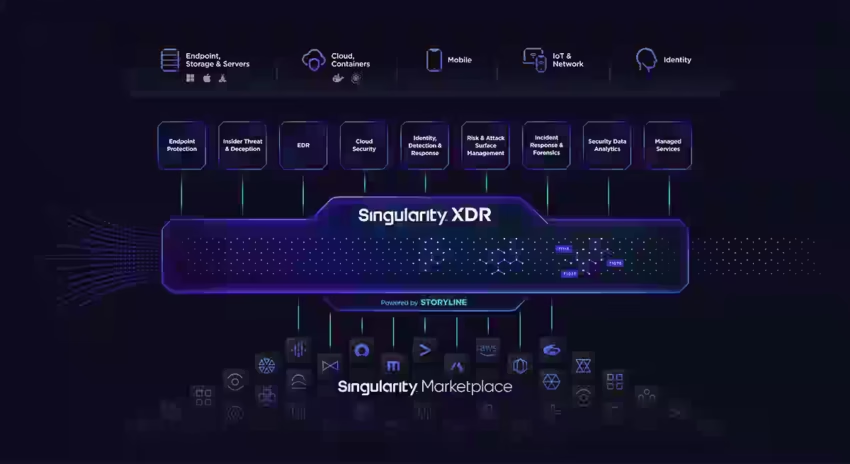
SentinelOne has set the technical standard for cloud-native EDR for years, and in 2026, it has become meaningfully more accessible to smaller organizations.
The Storyline technology tracks threat activity like a narrative, building a clear timeline of exactly what happened across your endpoints and when. When you need to understand an incident’s scope or reassure a customer that their data was safe, this contextual trail is invaluable. The platform’s autonomous response can detect, isolate, and remediate threats without any human intervention. For a business where nobody is watching a security dashboard at 2am, that matters enormously.
The ransomware rollback feature is worth highlighting specifically. If ransomware executes before containment, SentinelOne can restore affected endpoints to a pre-attack state without a full backup restore. That is real recovery capability, not just detection.
Pricing: Managed options start around $69 per endpoint per year; enterprise tiers scale up significantly. Best for: More mature SMBs wanting heavy automation, with someone who can review weekly reports. Honest limitation: Smaller businesses find higher tiers cost-prohibitive, and the full feature depth benefits from dedicated configuration time.
3. Sophos Intercept X — Best Endpoint Security for Ransomware Defense
Sophos has decades of security experience behind it, and Intercept X is the clearest example of a product built for businesses that are primarily worried about ransomware, which, in 2026, should be every small business.
The signature feature is CryptoGuard, which uses behavioral analysis to catch ransomware in the act of encrypting files and stops it before it gets traction, including variants never seen before. Sophos Intercept X combines deep learning AI and exploit prevention in a solution that is both powerful and easy to manage, which is genuinely rare. The most powerful tools are usually the most complicated. Sophos breaks that pattern.
For businesses already running Sophos firewalls, the Synchronized Security feature is a standout: the endpoint and the network device communicate directly and can isolate a compromised machine automatically, before any human reviews the alert.
The management console is clean enough for a non-technical business owner to open and understand what is happening without a tutorial.
Pricing: Typically $28 to $48 per endpoint per year, depending on tier. Best for: Small businesses specifically concerned about ransomware, teams wanting easy management, and existing Sophos firewall users.
For context on how endpoint security fits into your complete security stack, the complete cybersecurity toolkit for SMBs walks through every layer worth considering alongside EDR.
4. Microsoft Defender for Endpoint — Best for Microsoft 365 Environments
Here is something a lot of small business owners do not realize: if you are already paying for Microsoft 365 Business Premium, you probably have access to a surprisingly capable EDR platform sitting unused.
Microsoft Defender for Endpoint analyzes over 78 trillion signals daily, backed by one of the largest threat intelligence networks in the world. The two SMB-focused tiers- Plan 1 for essential protection and Plan 2 for full EDR with threat hunting and automated investigation let you start simple and scale as your needs grow.
The honest limitation: many small businesses have Defender deployed but lack the security staff to monitor and respond to its alerts. The software itself is solid. The problem is that it generates alerts and then waits for you to act. If nobody reviews the dashboard regularly, the protection you think you have is largely theoretical.
The practical fix is to pair Defender with a managed response layer or designate a specific person with a documented daily process for alert review.
Pricing: Included with Microsoft 365 Business Premium (approximately $22 per user per month for the full suite). Best for: Businesses already running Microsoft 365, Windows-heavy environments, and teams that want a single vendor relationship.
5. Malwarebytes ThreatDown EDR — Best Budget EDR That Actually Performs
Malwarebytes is a trusted name in endpoint security, and their ThreatDown EDR brings legitimate enterprise-grade detection capability to a price point most small businesses can actually afford.
ThreatDown EDR is powered by Malwarebytes’ global threat intelligence and a patented remediation engine designed to remove every trace of malware to prevent reinfection. The seven-day ransomware rollback restoring systems to a clean pre-attack state is a meaningful feature at this price tier. You do not typically see it from budget products.
The unified dashboard keeps management simple. AI-powered threat assessment reduces low-quality alert volume. It is not as feature-deep as SentinelOne at enterprise scale, but for a 10 to 50-person business needing real endpoint detection and response without complexity, it is one of the most practical choices on this list.
Pricing: Starts around $69 per endpoint per year. Best for: Budget-conscious SMBs that want genuine EDR without enterprise pricing.
6. Bitdefender GravityZone — Best for SMBs With Internal IT Capability
Bitdefender GravityZone Business Security Enterprise scores among the highest in independent lab testing year after year. Huntress specifically notes GravityZone as a strong option for businesses that have internal IT resources who can manage endpoint protection without outsourcing it.
The risk analytics module stands out. It scores your overall security posture and identifies specific misconfigurations and user behavior patterns that are actively increasing your exposure. This is actionable intelligence, not just an alert stream. GravityZone also handles patch management, full-disk encryption, and network attack defense within a single platform. For a growing business that wants one product doing heavy lifting across multiple security functions, this delivers.
Pricing: Typically starts around $77 per endpoint per year for Business Security Enterprise. Best for: Growing SMBs with at least one IT-capable person internally, businesses wanting a comprehensive all-in-one security platform.
7. Kaspersky EDR Optimum — Best for Non-Technical Teams
Kaspersky’s EDR Optimum is built specifically for teams without deep technical knowledge, and that design philosophy is evident throughout.
The solution offers user-friendly management consoles accessible for teams without security expertise, with automated threat hunting and incident response that matter most for businesses with limited IT resources. Alerts are presented in plain language with clear recommended actions, making it practical for a non-specialist to understand what actually needs attention versus what is background noise.
One consideration worth flagging: Kaspersky has faced regulatory scrutiny in certain markets, including a US government advisory. For businesses in regulated industries or holding government contracts, this warrants careful research. For private small businesses outside those specific contexts, the product performs excellently in independent testing.
Pricing: Starts around $30 per endpoint per year. Best for: Non-technical small teams in non-regulated industries, budget-conscious businesses prioritizing simplicity.
Five Questions to Ask Before Choosing an EDR Tool
Does It Watch Behavior, Not Just Known Signatures
This is the most important question. EDR has become foundational to modern cybersecurity precisely because attacks in 2026 use behavioral evasion techniques that signature databases simply cannot detect. If the vendor’s pitch is mostly about their threat database, move on.
Who Responds When an Alert Fires
Detection without response is an alarm system with no security guard. If your honest answer is “me, when I check email in the morning,” that is a real and serious gap. EDR is the technology, but you still need people to respond to what it finds. Choose managed EDR, or document exactly who does what within your team when an alert appears.
How Quickly Does It Isolate Infected Endpoints
Ransomware spreads laterally fast. Every minute of delay expands the blast radius. Look specifically for automated endpoint isolation — the ability to quarantine a compromised device within seconds, before any human intervention is needed.
Is the Pricing Genuinely All-In
Many vendors use module-based pricing that makes the initial quote look affordable before add-ons triple the actual cost. Confirm what is included in the base tier before you sign anything.
Does It Integrate With Your Existing Stack
If you run Microsoft 365, a tool that works natively with Defender adds immediate value. If you use an RMM or ticketing tool, check compatibility. The best EDR tools integrate with your existing stack to create layered defense rather than a new management silo you also have to maintain.
For a broader view of how security tools fit inside a complete business software environment, the 10 best business software stack guide is worth reading alongside this one. And if you are also weighing fintech and financial security, the guide to fintech tools for businesses covers the financial data protection angle that runs parallel to endpoint security.
Managed EDR vs Standalone EDR
This distinction is where a lot of small businesses make an expensive mistake.
Standalone EDR gives you the software and the alerts. Your team handles investigation and response. This works if you have someone internally who understands security and will check the dashboard every single day.
Managed EDR, often called MDR, Managed Detection and Response pairs the software with a team of human analysts working on your behalf around the clock. They triage alerts, confirm real threats, and take containment action so you do not have to.
49% of SMBs plan to prioritize real-time threat monitoring investment in 2026, but the challenge is always staffing. You cannot afford to hire a full-time security analyst at $100,000 per year. Managed EDR at $5 to $8 per endpoint per month gives you that expertise without the headcount cost.
My honest take: if you run fewer than 50 employees and nobody’s job description includes “cybersecurity,” managed EDR is almost always the smarter choice. The best standalone EDR in the world is still just software sitting idle if nobody is actively watching it.
EDR vs Antivirus
A lot of small business owners tell me they already have antivirus software and feel covered. I understand the logic. But consider what an antivirus cannot see.
Suppose an attacker steals your login credentials through a phishing email, not a file download, just a stolen password. They log in remotely using your own credentials. To your antivirus, they look completely legitimate. They spend four days quietly moving through your network, identifying key files and disabling backup processes. On day five, ransomware deploys across every device simultaneously.
Antivirus saw nothing wrong throughout that entire chain. EDR, watching behavioral patterns rather than file signatures, would have flagged the unusual login time, the lateral movement between devices, and the reconnaissance activity on day one and could have stopped the attack before it ever reached your data.
That is the real difference. Antivirus is not obsolete. It is just a lock on the front door. EDR is the full security system behind it.
If you are also thinking about how AI-powered threats are changing the attack landscape, how to defend against AI-powered cyberattacks adds important context to this conversation. And if your business relies on customer-facing digital communication tools, securing those is part of the same threat surface; the best chatbot platforms guide is a useful companion read on that side of your stack. For password security, which pairs directly with EDR as a layered defense, the best password manager options are worth reviewing, too.
Conclusion
In 2026, small businesses are the primary target for cybercriminals, not a secondary one. The attacks are faster, smarter, and more damaging than anything we saw five years ago. And the gap between “we have antivirus” and “we have real protection” has never been wider.
EDR is not a luxury for enterprises with dedicated security teams anymore. The tools on this list, particularly Huntress for businesses without IT staff, SentinelOne for automation, Sophos Intercept X for ransomware-specific protection, and Malwarebytes ThreatDown for budget realities, are genuinely built for small business environments and priced to match.
Three questions to answer right now: How many endpoints do you need to protect? Does anyone on your team have time to review security alerts daily? Are you already inside the Microsoft ecosystem? Match your honest answers to the tools above, and you will find the right fit quickly.
The best time to deploy endpoint detection and response was a year ago. The second-best time is right now.
Frequently Asked Questions
EDR stands for Endpoint Detection and Response. It monitors devices on your network in real time, detects suspicious behavior patterns, and automatically stops threats, even new ones that antivirus software cannot recognize before they spread across your systems.
Yes, fundamentally. Antivirus identifies known malware using signature databases. EDR detects unusual behavioral activity, making it effective against zero-day exploits, fileless attacks, and living-off-the-land techniques that traditional antivirus software completely misses in 2026.
Most small business EDR tools cost between $5 and $15 per endpoint per month. Managed EDR options — which include human analyst response — typically start around $4 to $8 per endpoint monthly, depending on the provider and tier selected.
Yes, with managed EDR options like Huntress. This pair detection software with human security experts who monitor alerts and respond on your behalf around the clock, making enterprise-grade endpoint protection genuinely practical without requiring in-house security expertise.
EDR is the software that detects and responds to endpoint threats. MDR, Managed Detection and Response, adds human analysts who work on your behalf 24/7. For small businesses without security staff, MDR provides the human response layer that software tools alone cannot replace.
Defender is a capable platform when actively monitored and managed. Most small businesses have it deployed but underutilized because no one reviews alerts consistently. Pairing Defender with a managed response layer like Huntress significantly improves its real-world protection.
Most cloud-based EDR tools deploy across all endpoints within hours. Lightweight software agents install quickly, and modern platforms are preconfigured for immediate protection without weeks of custom setup or security expertise to get started.

- 10 Best Cloud Storage Solutions for Businesses - April 10, 2026
- Best EDR Tools for Small Business in 2026: Tested & Ranked - April 9, 2026
- Best Neobank for Small Business in 2026: Full Comparison - April 8, 2026