A startup founder spent three days setting up Notion for her five-person team. Custom databases, linked views, a company wiki, a project tracker, an onboarding template she found on Reddit that someone called “life-changing.” By day four, two of her team members were still confused about how to add a task. One of them quietly went back to using a paper notebook.
Six months later, she switched to Trello. The entire team was up and running in twenty minutes.
That story is not an argument against Notion. It is an argument for understanding what each tool actually is before committing to one. The question is never which tool is better in the abstract. It is the tool that fits the way your team actually works.
Notion vs Trello
Trello is better for beginners who need a simple visual task board they can use immediately without any learning curve. Notion is better for teams that need an all-in-one workspace combining task management, documentation, databases, and wikis, and are willing to invest time learning a more complex system.
If you need to start managing tasks today without spending hours on setup, choose Trello. If you want to eventually replace four or five different tools with one platform and are prepared for a steeper climb getting there, Notion is worth that investment. Most comparisons treat Notion and Trello as direct competitors fighting for the same users. They are not really. They solve related but different problems, and understanding that difference makes the choice much clearer.
What does Trello do?
Trello is a Kanban board. That is its entire identity, and it does not try to be anything else. You create boards, add lists to those boards, and fill those lists with cards that represent tasks. Cards move from left to right as work progresses, typically from something like “To Do” through “In Progress” to “Done.”
The visual simplicity is deliberate and genuinely useful. At a glance, you can see exactly where every task stands without opening anything, clicking anything, or reading anything beyond the card title. Trello launched in 2011 and has grown to over 50 million users, largely because that visual clarity translates across industries, team sizes, and use cases without requiring any configuration.
What Notion Does?
Notion is an all-in-one workspace that combines notes, databases, wikis, task management, and documentation into a single platform built from flexible building blocks called pages and databases. Every piece of content in Notion is a block, and those blocks can be rearranged, linked, filtered, and connected in ways that give teams an enormous amount of structural flexibility.
With 100 million users globally, Notion has become the tool of choice for teams that want to consolidate their software stack. One team documented by SaaS Price Pulse replaced Confluence at $10 per user, Trello at $12 per user, and Google Sites entirely by switching to Notion Plus at $10 per user, cutting their per-user tool cost in half while reducing onboarding time from three days to one.
The One Difference That Changes Everything
Trello is a task management tool. Notion is a workspace platform that includes task management among many other things. Comparing them as equals is like comparing a screwdriver to a Swiss Army knife. The screwdriver does one thing extremely well. The Swiss Army knife does many things adequately and some things very well, but it takes longer to figure out which tool is which before you can use it.
Ease of Use
This is where Trello wins decisively, and it is not particularly close.
Opening Trello for the first time, you see a board, some sample lists, and a few example cards. The entire interface is visible at once. Creating a new card takes one click and typing a name. Moving it between columns is a drag and a drop. There is nothing to configure, no terminology to learn, and no setup required before you start being productive. Independent user surveys show that 80% of Trello users rate its ease of use as good, one of the highest ratings in the project management category.
Notion’s experience is fundamentally different. The blank page you see when you first log in is intentionally flexible, which means it is also intentionally empty. There are no default views, no preset structures, and no obvious starting point unless you choose a template. The block-based architecture that makes Notion so powerful is also what makes it intimidating initially. Understanding the relationship between pages, databases, views, and properties takes time that Trello simply does not require.
Most new Notion users spend their first week consuming tutorials and setting up structures before they actually use the tool productively. That is not a criticism of Notion. It is an honest description of what adopting a highly flexible platform looks like, and it is information worth having before you commit.
Features Side by Side
Task Management
Trello’s task management is visual, immediate, and limited by design. Cards can have due dates, attachments, checklists, labels, and comments. The new Trello Inbox feature, added recently, centralizes tasks arriving from email, Slack, Teams, and Siri into one place so nothing gets missed across different communication channels. The new Trello Planner gives you a calendar-based view for scheduling tasks across time.
What Trello cannot do natively is manage task dependencies. If task B cannot start until task A is finished, Trello has no built-in way to model that relationship. You can work around it with labels and comments, but it is not a structured feature.
Notion handles task dependencies through its database and relation properties, which allow you to link records across databases and filter views based on those relationships. It is more powerful, but it requires more setup to get working and more maintenance to keep accurate as projects evolve.
Views and Visualization
Trello’s free plan gives you the Kanban board view by default. Timeline, Calendar, and Dashboard views are available but locked behind the Premium plan at $10 per user per month.
Notion gives every plan, including the free tier, access to all database views simultaneously: table, board, calendar, gallery, timeline, and list. You can switch between them with one click on the same underlying data without changing plans or paying more. For teams that need multiple ways to visualize the same project, Notion’s approach is significantly more generous at every price point.
Automation
Trello includes Butler, a built-in automation engine that works on if/then rules. When a card moves to the Done list, mark it complete and notify the assignee. When a due date passes, add a red label. Butler handles these kinds of trigger-based automations cleanly and is available on all paid plans, with limited runs on the free tier at 250 per month.
Notion’s automation features are less mature. Basic automation exists, but it is not as flexible or as well-developed as Trello’s Butler for rule-based task workflows. Notion AI adds intelligence on top of content, but it is a separate paid add-on rather than a built-in automation system.
Integrations
Trello connects to over 200 applications through its Power-Up system, including Slack, Google Drive, GitHub, Salesforce, and Jira. The free plan limits you to one Power-Up per board, which is restrictive for teams that need multiple integrations on the same project.
Notion integrates with tools including Slack, GitHub, Jira, Figma, and Google Workspace. Its integration depth varies by tool, and some connections are more reliable than others, but the overall ecosystem has matured significantly over the past two years.
Free Plan Comparison
Both tools offer free plans, and both have meaningful limitations worth understanding before you build workflows around them.
Trello’s free plan gives you unlimited boards, unlimited cards, and unlimited members. The restrictions are ten boards per workspace, one Power-Up per board, a 10MB file attachment limit, and 250 Butler automation runs per month. For a small team managing straightforward projects across a handful of boards, the free plan handles real work without forcing an upgrade quickly.
Notion’s free plan gives individuals unlimited pages with no meaningful restrictions. For teams, it is a different story. The team free plan limits you to 1,000 blocks shared across the workspace. A block is any piece of content, including individual lines of text, images, checkboxes, and table rows. An active team filling in a project tracker, writing meeting notes, and maintaining a basic wiki can exhaust 1,000 blocks within days. The 5MB file upload limit and 7-day page history add further friction for teams trying to use Notion seriously without paying.
For genuine team use without paying, Trello’s free plan is more functional and longer-lasting than Notion’s.
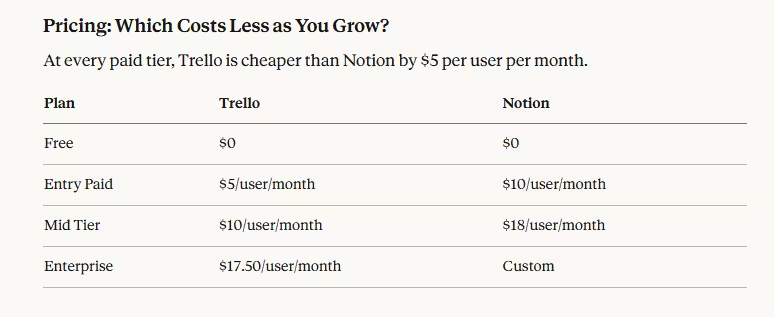
For a team of ten people on entry-level paid plans, Trello costs $500 per year, and Notion costs $1,000 per year. That $500 difference is meaningful for small businesses and startups watching their software budget carefully.
The counterargument for Notion’s higher price is consolidation. If Notion replaces multiple tools your team currently pays for separately, the net cost can actually be lower. The team mentioned earlier that replaced Confluence, Trello, and Google Sites with Notion Plus went from $22 per user to $10 per user. The math works when Notion genuinely replaces other subscriptions rather than being added on top of them.
Who Should Use Trello?
Trello is the right choice when your primary need is tracking tasks visually, and you want everyone on the team productive on day one without training sessions or documentation.
It works particularly well for freelancers managing client projects across different stages, marketing teams running campaign calendars, design teams tracking feedback and revision rounds, and small businesses that need a shared view of what is being worked on without the overhead of a complex system. If your workflow fits naturally into columns representing stages of progress, Trello is probably all you need.
It is also the better choice when your team includes members who are not comfortable with technology. The Kanban format is intuitive enough that people who have never used project management software before can understand it within minutes of seeing it for the first time.
Who Should Use Notion?
Notion makes sense when task management is one of several things you need, and you want a single platform handling all of them rather than four or five separate tools talking to each other imperfectly.
Content teams that need both an editorial calendar and a documentation library in one place get genuine value from Notion’s flexibility. Startups building internal knowledge bases alongside project tracking find that Notion handles both without requiring separate subscriptions. Education teams and researchers who need structured databases linked to written documents have use cases that Trello simply cannot address.
The honest prerequisite for Notion is patience. The payoff is real, but it requires an upfront time investment in setup and learning that Trello does not. Teams that skip this and expect Notion to work intuitively the way Trello does tend to abandon it within a month, which is where the reputation for being overly complicated comes from.
Can You Use Both?
Yes, and many teams do deliberately rather than by accident.
The most common pattern is using Notion for planning, documentation, and knowledge management while using Trello for day-to-day task execution. Notion holds the strategy, the meeting notes, the onboarding guides, and the project briefs. Trello holds the active task board where work actually moves through stages.
This combination makes particular sense for teams that have already invested in both tools and find each genuinely useful for different purposes. It does add a layer of tool-switching to the workflow, which some teams find acceptable, and others find disruptive. If you are starting fresh and have not committed to either, picking one and using it fully is almost always better than splitting work across two platforms from the beginning.
FAQ
Trello is better for beginners. It requires no setup, has almost no learning curve, and most users are productive within minutes of signing up.
Yes. Notion includes a Kanban board view that replicates Trello’s core functionality. Many teams switch from Trello to Notion when they need documentation and task management in one place.
Trello’s free plan is more practical for teams. Notion’s 1,000 block team limit fills up quickly for active users. Trello gives unlimited cards and members with no block restrictions.
Yes. Notion costs $10 per user per month at the entry level, versus Trello’s $5. The gap widens at higher tiers.
Trello is a dedicated Kanban task board. Notion is an all-in-one workspace combining notes, databases, wikis, and project management in one platform.
Yes. Many teams use Notion for documentation and planning, and Trello for active task tracking. Both integrate with Slack and other common business tools.
Trello for teams that primarily need task tracking. Notion for teams that need documentation alongside project management and are prepared for the setup time required.

- Is Agentic AI Safe to Use? What You Need to Know in 2026 - March 28, 2026
- Real World Agentic AI Use Cases in 2026 - March 27, 2026
- 10 Best Parental Control Apps 2026 - March 27, 2026