Dollar General employs over 140,000 people across its stores. With that many employees spread across thousands of locations, payroll questions come up constantly. Getting your Dollar General pay stub is straightforward once you know where to look, but the process isn’t always explained clearly at onboarding. This guide covers every method available for current and former employees.
The DGME Portal is the main access point
The primary way to access your Dollar General pay stub is through the DGME employee portal, which stands for Dollar General My Employee portal. It’s the company’s central platform for payroll information, work schedules, benefits, and HR services.
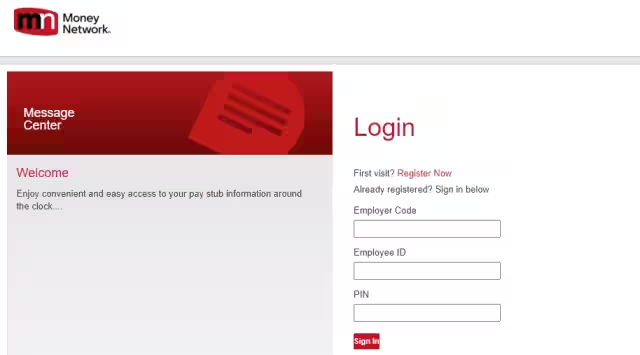
The portal is available at webapps.dolgen.net and can be accessed from any device with an internet connection, including your phone. You don’t need to be at a store computer, though that option also works.
How to log in as an existing user
If your account is already set up, the process takes under two minutes:
- Go to the DGME Pay Stub Portal
- Enter your Employee ID and PIN
- Click Sign In
- Select the Pay Stubs option from the menu
- Choose the pay period you want to view
- Download or print directly from the portal
Once inside, you’ll also see options to set up email and text alerts so that your Dollar General pay stub gets delivered automatically, two days before each payday. That’s worth setting up if you check your pay regularly.
How to register for the first time
New employees who haven’t created an account yet need to register before logging in:
- Go to the DGME Pay Stub Portal
- Click Register Now
- Enter your Employee ID, date of birth (MMDD format), and the last three digits of your Social Security number
- Click Submit
- Create a PIN or password and submit again
After that, your login credentials work immediately and you can view all available pay stubs from that point forward.
What your pay stub actually shows
A Dollar General pay stub breaks down your earnings for a specific pay period. The key sections include:
- Gross pay: Total earnings before any deductions
- Federal and state tax withholdings: What was withheld based on your W-4 filing status
- FICA deductions: Social Security and Medicare contributions
- Benefits deductions: Health insurance premiums, 401(k) contributions, or any other voluntary deductions you enrolled in
- Net pay: The amount actually deposited or paid to you after all deductions
Reading through these line items matters. It’s the only way to confirm your hours were recorded correctly, your tax withholding is set the way you intended, and your benefit deductions match what you enrolled for.
Accessing pay stubs on the store computer
Some employees, particularly those without a personal device or reliable internet access, use the office computer at their store location. The process is the same: log into the DGME portal using the store PC, navigate to pay stubs, and either view them on screen or print directly from there. Your store manager or ASM can show you where the portal bookmark is on the office computer if you haven’t used it before.
What to do if you forget your PIN or can’t log in
If your PIN isn’t working, the DGME portal has a reset option on the login page. You’ll need your Employee ID and the same verification details used during registration to reset it. If you’re locked out or the verification process fails, contact the Dollar General HR department directly at 1-877-463-1553. They can reset access on their end.
How former employees access their pay stubs
If you’ve left Dollar General, your DGME login may still work for a period after your last day. Try logging in with your existing credentials first. If access has been revoked, you have two options:
- Contact your former store manager and request copies, either printed or emailed
- Call the HR department at 1-877-463-1553 with your employee ID and dates of employment ready
Former employees are legally entitled to copies of their pay records. This is especially relevant at tax time when you need documentation of earnings from a prior employer for W-2 verification or loan applications.
W-2 forms through the same portal
The DGME portal also stores your W-2 forms, which are available each January for the prior tax year. If you opted into electronic delivery during enrollment, your W-2 will be accessible in the portal before the paper copy arrives by mail. Log in the same way, navigate to the tax documents section, and download it directly. This saves time compared to waiting for the mailed copy, particularly if you’re filing early.
Similar read: What Is Ford Online Pay Stub
FAQs:
Pay stubs are typically available on the Dollar General Employee Portal a few days before payday. The exact timing may vary depending on your location and payroll schedule.
2. What information is included on a Dollar General pay stub?
A Dollar General pay stub includes your gross pay, taxes, deductions, and net pay for the pay period. It may also include other information such as year-to-date earnings and deductions, as well as details on any overtime, vacation, or sick leave taken during the pay period.
3. How do I make changes to my direct deposit information?
To make changes to your direct deposit information, you will need to contact your supervisor or the Dollar General HR department. They can provide you with the necessary forms and guidance on how to update your direct deposit information.
4. What should I do if I notice an error on my pay stub?
If you notice an error on your pay stub, such as an incorrect wage rate or missing hours, you should contact your supervisor or the Dollar General HR department as soon as possible. They can help you address the issue and ensure that you are paid correctly.
5. How do I access my pay stub if I don’t have access to the internet?
If you don’t have access to the internet or the Dollar General Employee Portal, you can request a paper copy of your pay stub from your supervisor or the Dollar General HR department.

- Cloud Cost Management in 2026: FinOps Strategies That Work - April 5, 2026
- Top 10 Fintech Trends Dominating April 2026 - April 4, 2026
- Ultimate Guide to Fintech Tools for Businesses 2026 - April 3, 2026